Food Hunt Level 214 Walkthrough
IntermediateFood Hunt Level 214 is a pixel-art board. Measured from the board image on this page, the picture breaks down into 10 colours, each covering at least 2% of the board: cyan covering the most at 21.7%, then blue (19.7%) and orange (19.1%), with 7 smaller colours behind them. No flat background band was detected on this board — every sampled cell reads as part of the picture.
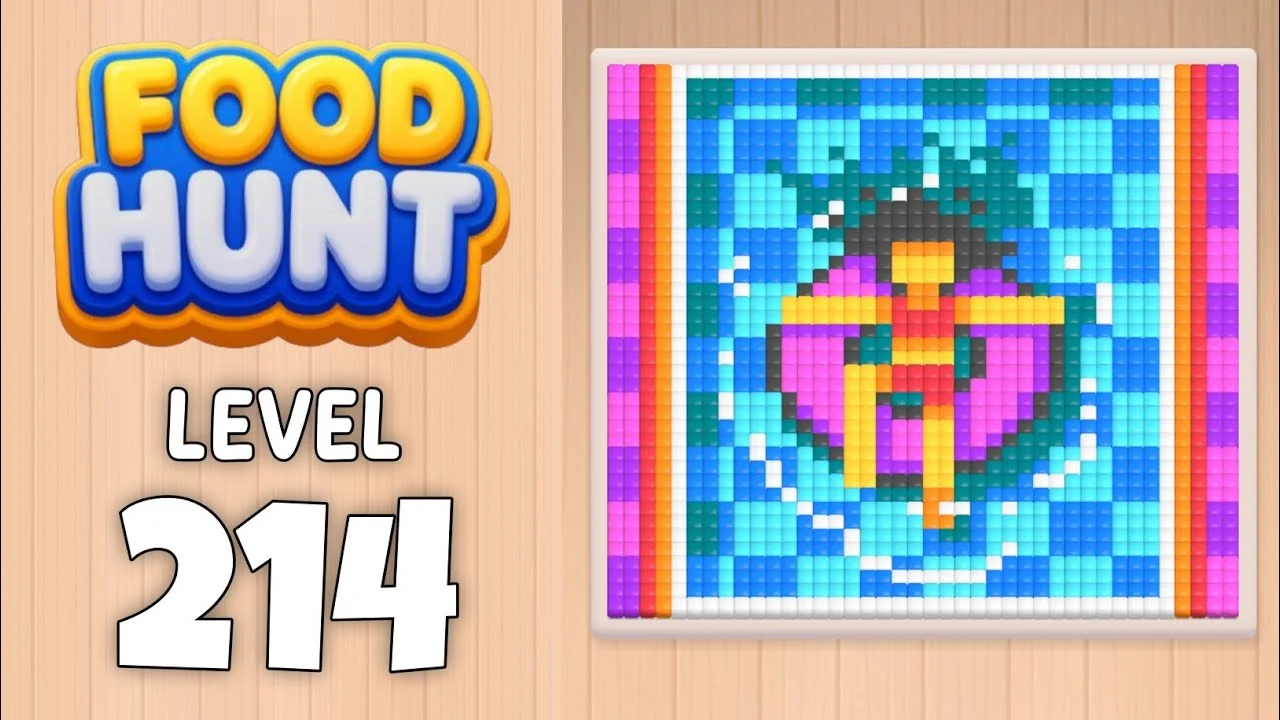
What the Level 214 board is made of
10 main colours, each covering at least 2% of the board, measured from the board image on this page.
cyan 21.7% of the board
95% of it is walled in by the colours around it, so this block stalls until they are eaten.
blue 19.7% of the board
88% of it is walled in by the colours around it, so this block stalls until they are eaten.
orange 19.1% of the board
46% of it sits inside the picture; the rest is open.
dark cyan 12.6% of the board
90% of it is walled in by the colours around it, so this block stalls until they are eaten.
dark grey 6.2% of the board
All of it is walled in by the colours around it, so this block stalls until they are eaten.
pale blue 5.3% of the board
86% of it is walled in by the colours around it, so this block stalls until they are eaten.
cream 5.3% of the board
2% of it sits inside the picture; the rest is open.
pink 4.1% of the board
All of it is walled in by the colours around it, so this block stalls until they are eaten.
purple 3.0% of the board
All of it is walled in by the colours around it, so this block stalls until they are eaten.
white 3.0% of the board
84% of it is walled in by the colours around it, so this block stalls until they are eaten.
Read from the board image on this page, last measured 2026-09-25. Colour names are read off the hex shown beside them and may differ from the name the game gives that block. The game decides which block you can feed, so treat this as what the board costs to clear, not as a tap order.
How to read the Level 214 board
Start with the biggest colour: cyan
cyan covers 21.7% of the board — more than any other colour on this board. A block only clears once every matching cell is eaten, so the biggest colour is the slowest to drain and the one worth seating as soon as the queue offers it.
dark grey cannot finish early
Every cell of dark grey is walled in by cyan, blue and 6 other colours in the board image. That part of the block stays stuck until the surrounding colour is eaten, so expect a long stall rather than a failed run.
Food Hunt Level 214 — frequently asked questions
- What colours are on the Food Hunt Level 214 board?
- The board image breaks down into 10 main colours, each covering at least 2% of it: cyan (#56E4F5, 21.7% of the board), blue (#1F89F5, 19.7% of the board), orange (#F58742, 19.1% of the board), dark cyan (#0B8493, 12.6% of the board), dark grey (#525256, 6.2% of the board), pale blue (#349DF1, 5.3% of the board), cream (#F7ECDF, 5.3% of the board), pink (#FA64EF, 4.1% of the board), purple (#B741F1, 3.0% of the board) and white (#E0F3F8, 3.0% of the board).
- Which colour should I clear first in Food Hunt Level 214?
- cyan covers the most of the board at 21.7%, and blue is next at 19.7%. The board cannot tell you the tap order on its own — which block you can feed is decided by the queue at the bottom of the screen, and it changes as blocks clear. The board image does show what each colour costs: start the biggest colour you are offered, because it has the most cells to eat, and hold back any colour that is walled off until its neighbours are gone.
- What difficulty is Level 214 in Food Hunt: Pixel Puzzle?
- Level 214 is rated Intermediate difficulty in Food Hunt: Pixel Puzzle.
- Is there a video walkthrough for this Food Hunt level?
- Yes — the walkthrough video on this page plays the full clear of this board, so you can follow the tap order block by block. The board image next to it shows what the finished picture is made of.
More intermediate walkthroughs
View all →
Featured walkthroughs
The levels players search for most - each with a full video guide.